The following is my random some-what delayed thoughts after attending Gnomedex 9 in Seattle. I attended on my own dime so these thoughts begin and end with little ole me.
This is my second Gnomedex, the first being in 2006. Having missed the last two, I put Gnomedex 9 on my schedule as soon as possible so as to avoid missing it. Last year was bittersweet: as my Sweetie and I pulled our luggage behind us on the way to the Victoria Clipper for a wonderful getaway weekend, we passed by the Chris Pirillo signs to Gnomedex 8.
It was a great trip to Victoria (hi, Sweetie!) but I sure missed Gnomedex.
Gnomedex 9 was pretty different than 6. Blogging and "New Media" of course were big during Gnomdex 6 as was the emergence of Firefox and the burgeoning Mac laptop community. Since then, we've had three big things:
- Facebook,
- Twitter, and
- The ever connected
JesusiPhone.
This year: no Blake Ross. No Crazy Uncles. The replacement? The social media crowd. The lovers of Facebook, Twitter, and the devices that let them Tweet and share and experience like crazy. In the end, I felt that the crowd - a very engaged, smart crowd - was more about leveraging technology than the creation of the technology. More on that at the end.
Some interesting answers from the crowd:
- First timers? Seemed like 85% of the crowd was new. Wow. I'm glad Chris was able to pull such a large, engaged crowd together this year, economy and all.
- Mac users? 50%. I read someone Tweet that they saw more PCs this time than last year.
- iPhone users? 90%.
The presentations were all Mac laptop driven and the Macs demonstrated while they certainly aren't perfect (power and battery lifetime, odd Keynote playback issues) the users are willing to forgive them for being rascals.
Surface. Microsoft Surface was a *hit* with the audience. Who ever came up with the idea to bring Surface to the conference deserves a big bear hug. It was also a hit to ensure there was digital ink on the back of the conference card such that you could slap your registration card down on the table and have it pop up UI, like to bring up your digital business card which other people could drag to the sphere around their conference card and "add" to their contacts. Ba-rill-yant. People loved that, and they also loved the background flickr / Twitter #gnomedex feed that people could grab, examine, and then let flow back into the river of pictures and tweets. The pictures you could add to your card by dragging them over to your card's sphere, but not the tweets. You should be able to add the tweets - that would be sweet.
But anyway, for the Gnomedex crowd (given the usage of flickr and Twitter) it was the exact right social combination.
People enjoyed bringing up the different applications for Surface, too. It's as if Microsoft got an Apple-quality product out first, so it's quite the curiosity and something delightfully foreign to the attendees.
Now let's hope that they remember to log-in and get their contacts and pictures off of their card later. Because it's doubtful most will run into a Surface again anytime soon. (Hmm, just visited my card site. Okay, I have ideas on how to make this all a bit better.)
Microsoft Bing was there, and, well, didn't get as much love as Surface. On day one only ten people turned in their vote for the Bing contest / raffle. They should have held that raffle (darn it) because I was one of them! Ah, well. Chris had to stick it to the crowd several times to vote, probably saying something about the attendees, too, and their loyalty (heck, even our MSNBC guy, Jim Ray, during his presentation said something along the line of "I definitely recommend you use Google and not our stuff"). Probably if they had spent 10 minutes actually showing people the contenders live (oh, that might have taken a PC) then the attendees would have jumped in to vote.
Presentations. This year the presentations seemed like a mini-TED. Some science, some perspective, personal stories, and a general sense of high aspiration with some inspiration. So a mini-TED… with F-bombs. Maybe the real TED has F-bombs, I don't know, but I do hope this year's was the F-bomb peak for Gnomedex's lifetime. I have a couple of quick notes about the various presentations here:
- http://www.ericri.com/et/blog/2009/08/random-notes-from-first-day-of-gnomedex.aspx
- http://www.ericri.com/et/blog/2009/08/random-notes-from-second-day-of.aspx
There's also a CNN summary of the conference here: http://scitech.blogs.cnn.com/2009/08/24/gnomedex-puts-the-human-face-on-tech/ .
For me, the most touching was "My Cancer is Social" by Drew Olanoff (hey, I just received my yellow #BlameDrewsCancer shirt!). It was a tale with two takes on dealing with cancer: a private "I'm going to deal with this on my own" take, and a public "get everyone to blame their woes on my cancer" take. It also showed what is meant by leveraging social media in an open, real, short-term way. Entropy will ensue. What will the longterm impact be?
The talk which proved a twitter-backchannel stream can be brutal was Christine's "Life Extension for Geeks" talk. How can presenters get some sense of the mood of the room via social media while they are presenting? Will they need an assistant texting them real-time suggestions?
The twitter-backchannel stream was also a bit brutal for Firas Khatib's presentation on the protein folding game, http://fold.it/. Hey, I've known about those scary-ass prions for quite some time and this stuff is cool, so I was into it. But I'm an engineer geek, not a social media geek tech lover. A lot of tweets were "I don't get it" and Chris Pirillo, seeing the audience struggle, came to the rescue to help redirect the talk to the basics of, well, why one should care: "Because you'll help cure diseases." Ah. It probably would have been good to start there, even to scare the bejeezus out of people talking about prions a bit more.
The best pulling together past obscurities goes to Chris Brogan for the "Rise of the Trust Agents" talk. I say it that way because part of his talk demonstrated how attention is needed to build anysort of leverage in the social media world, and how quickly it can dissolve. I've, uh, given grief to the concept of attention before and how it was the Next Big Thing (a few years ago) but now it certainly makes sense: in a world constantly filling with a flow of bite size content, it takes something special to achieve the attention of an audience; those with that attention must built reputation and trust to keep it and to build on it.
Bre's MakerBot (1.0?) was cool -- I think when they make the designs mashable so that people can add their own logos to the stuff they make (plus make it come out smooth) then they'll really get interest going. I think Dave Winer made a comment back in 2006 about everyday folk being able to create their own stuff. Anyway, if I was a kid and I had a MakerBot and some 3D design software: I would be fabricating monsters All Day Long.
Conversations: the connections and conversations at Gnomedex is just as big as the presentations. Three parties to two days of presentations. I enjoyed chatting with Kathy Gil and learning about her UW class' twitter book coming out soon. http://twitter09.wordpress.com/ . I also had some endlessly fascinating conversations about health care policies and how best to manage the complex political and corporate forces swaying it (administration to administration, to boot). Then of course the techie stuff, Canon vs. Nikon (no contest), chatting with fellow 'softies, wishing I could hear better in noisy bars, learning about Austin (lots of former DC folks), hearing how iPhone development was like, and hearing lots of perspective from frequent Gnomedexers on how it has evolved over the years.
The conversation I brought up a few times had to deal with "where do digital memories go?" Specifically, we, our friends and people we respect are creating memories we'd one day would like to reflect on. Is it all just tears in rain, to quote one Roy Batty? If five years from now I want to think about the good times at the Gnomedex's I've been to, how successful am I going to be conjuring up the tweets, perhaps weighting the ones most often retweeted or linking to the same resultant URL? How will I pull the hash tags together into some related interesting thoughts auto-organized for me to enjoy and easily explore? People who were my friends then and who are my friends now: what did they share?
Sure, there's a lot of noise. But there's a lot of beautiful signal in there, too, waiting to be enjoyed again and allowing us to tumble through a treasure of related memories. Again and again.
Spam = Success: twitter is a success. How do I know? The spammers are freaking all over it. As soon as the #gnomedex hash tag became a trending topic, the spammers and their tools went to work and we started seeing random tweets for grocery gift cards and movies. And "hi theres" from alluring young women who, yes, are probably some large dude in his parents basement.
Build the Future: The software developer quotient was lower than I expected, evidenced by Amazon recruiting struggle to award Code Ninjas for folks who could solve their code puzzles. I think they realized it's not an ideal recruiting venue (maybe that will change in the future). Ah, well, I got my little ninja dude; now I have to find an interesting place to take his picture… ooo, Mr. Ninja needs to go visit RedHook!
Looking forward, I'd like to see some of the tech creators some back and talk and engage with the Gnomedex crowd and have that public conversation. In order for the next round of technology to emerge, you need to see the current problems and pain points. And opportunities. As I wrote above, I see people creating a bunch of throw-away memories. Where goes your tweets? If five years from now you have a quiet moment to reminisce about this summer, would there be some set of memories jogged up to the surface if you had your tweet stream there, weighted by the re-tweets and hash-tags and shared tags and tweets with your friends and followers of the time? A lot of it might be throw-away and transient, but some not. Some might make you smile. Or cry. Like a good memory should.
That's my takeaway, as a developer, having attended this year's Gnomedex. There's a lot of content out there, and I want the lifestreams important to me to stay close, not only for today and tomorrow, but for all of my tomorrows.
I hope to you see you at Gnomdex 10!


If you find yourself strangely unable to open video files, like WMV (Windows Media video) from a web page, you might need to implement the fix in KB974538.
What happened for me on my Vista laptop is that I decided to click on a video review for the new Xbox 360 Batman game (please don't judge me). And as a result, I got an IE8 error page with the message "Internet Explorer cannot display the webpage" and then a little "What you can try: [Diagnose Connection Problems]".
I had opened plenty of WMV files recently. What changed? Oh, I had recently installed the latest version of Windows Live so that I could enjoy the wonderful new Windows Live Movie Maker. All sorts of great and good changes happened in that update. Including, however, an itsy-bitsy-teeny-weeny break in video type registration.
So I went to KB974538, Video Files do not play back as expected in Windows Internet Explorer and other applications after installing, upgrading or uninstalling Windows Live Photo Gallery. There's a little snippet of registry goo between those dashed lines that you need to save as fix.reg and then double click and apply.
Ba-da-bing, ba-da-boom, it's all working again. Nice.
I hope this helps anyone else that runs into the situation.
Follow-up from yesterday: slides of Drew's "My Cancer is Social" from Day 1 (Random Notes from the First Day of Gnomedex 09): http://www.slideshare.net/drewolanoff/gnomedex-2009-presentation-drew-olanoff
Chris kick-off:
www.arsights.com - augmented reality http://www.arsights.com/ - download and printer paper template and then you can download google earth models and play around with moving them. Coverage yesterday: King5. Geek centric time-wasters. Social media focused. http://www.king5.com/business/stories/NW_082109BUB-gnomedex-KS.102ad175e.html . Mark Glasser: http://www.pbs.org/mediashift/2009/08/gnomedex-90-tech-conference-looks-deeper-at-social-media233.html
#1 A Twitter Top-Ten List (with Humor!) - Frank Eliason
Comcast cares. http://twitter.com/comcastcares - When phone volumes in customer care spikes, the first thing the look for is what's happening on Twitter that might be related to the phone call spike.
Top ten:
- 10 Employees: Your employees are on twitter. People are going to talk.
- 9 Customers: Your customers are on twitter.
- 8: I work for Comcast.
- 7: It all starts with a Tweet. YouTube: look for Motrin Moms. Response: on web site for two months, drawing additional attention.
- 6: Sometimes you just need a break: Fail whale.
- 5: To go with your break: free stuff.
- 4: All businesses need: a social media experts.
- 3: Your brand is Trending. And what do you have to say?
- 2: We hear of businesses on Twitter all the time. Always same brands? Tools.
- 1. Make New Friends: YouTube Telemarketing video by Chris Pirillo. This space is all about relationships. Can turn your detractors into your biggest raving fans. Back to Chris' video: telemarketer called Chris to adopt internet service (Chris was already on it).
#2 Hacker Journalists - Mark Glaser and Jim Ray
A brief history... and a live specimen. MarkGlasser@mediatwit, JimRay@jimray. Challenge:
- Check out the projects
- Come up with your own project
- Must combine mashup - inform public. Maps + Multimedia.
- Just an outline, an idea
- Winning ideas features on PBS MediaShift.
Patron saint: Adrian Holovaty. http://chicagocrime.org/ - picked up crime data, pull it in, and show in maps. Journalist's job: gather info, distill info, present info. Next project: http://www.everyblock.com/ for news around the block.
PolitiFace.com - truth scorecard on politician statements. Won a Pulitzer for the truth-o-meter.
Located media: see a cell phone number marked for a site: call that number and get some history. Example: Bronx Rhymes. http://turbulence.org/Works/bronx_rhymes/
Jim Ray at MSNBC.com. Anthropology storytelling + compsci @ UNC. Flickr stream. Degree: multimedia story telling. MSNBC just purchased EveryBlock. What is MSNBC really buying if the code is already open sourced? Adrian did Django.
Reviewing various projects: Political Maps, Hurricane Data. Hurricane Tracker. http://www.msnbc.msn.com/id/26295161/
Snark market: post on the article that you get and parts you don't get. Too much background information / historical context. http://snarkmarket.com/blog/
Twitter and tapping into the zeitgeist. Info / twitpics.
Traditional software development process (feature based) just didn't work very well. Need to start at the Universities to get new journos up to speed on leveraging technology. Need to graduate more people who have the skills and think different so that they can be hacker journos.
#3 Nerd Craft: A Field Guide - Beth Goza
Nicely constructed presentation! Ansley Bleu: Bleu Arts: Princess Liea Star Wars "hat". Stitch Wars. Lord of the Rings. Lord of the Strings. Television. Stephanie Bryant - mortaine on Ravelry - comic panels (handknit heroes). Lifesize knitted Ferrari.
#4 Building Influence Online - Micah Baldwin
Micah started Follow Fridays on Twitter. Measuring Online Influence. The art and science of being awesome. Ignite Micah (Mee-haw). Whats Awesome about Influence? "Who is the #1 douchebag" on Google. "Why do I care about awesome" - Started Follow Fridays on Jan 16th. Would this become spammy. Nah. In the end. Yeah.
- Define influence
- Identify components of influence
- Provide a formula for influence
Influence: implicit or explicit effect on one thing (or person) on one thing (or person). Components:
- Trust: person A will always act as person B expects them to act. "Random trust equation" - expectations.
- Branding: is designed to create expectations about you and your actions. Be you. Personal brand shouldn't be influenced by corporate brand.
- Expertise: knowledge is gained, expertise is given.
Influence = Reach (Brand * Expertise * Trust)
How to build online influence (become more awesome).
- Write like on one is reading.
- Write when you want to write.
- The moment you think "that would be a good blog post," you become a blogger.
Become involved (#BlameDrewsCancer). Best part of community is feedback. Listen and learn about the things you need to change, evaluate, and change.
Content discovery and filtering: be a human filter; if you have trust, you can aggregate knowledge on your blog.
"Install Lijiit" my slides are at http://bit.ly/3PpqZs sorry I didnt get them up before! #gnomedex - http://www.slideshare.net/micahb/how-to-be-awesome-gnomedex
#5 20,000,000 vs 20: Audience vs. Impact - Jay Grandin & Leah Nelson
"We're not geeks, but we're trying really, really hard to be."
Storytellers. JayGrandin; AntLeah; GiantAntMedia; BongoFilm. Fart jokes ending up helping in Tanzania to record a hip-hop album. (no sound - pesky Macs.)
Qualifications: viral vidoes: "How to shower: Women vs. Men" ==> Myspace; next YouTube "How to conceal a fart" Viral potential: Farting, Being Naked, really viral: Farting while Naked "A Date with a Giant Penis" YouTube video. Waiting on MySpace deal for content creator. Connected with MySpace friends to have places to stay / crash at around Europe. Finding: f#ck viral. Content viewership took a nose dive when starting to create videos important to Jay & Leah. Engagement, however, increased.
Created "Urban Project" and raised $8k. Tanzania.
http://BongoTheFilm.com <-- final film on the Tanzania hip-hoppers. Playing trailer. http://theurbanproject.org/
#6 TBD Improv Show and Tell Time
... www.retailmenot.com - international. Find coupons. ... Q: how many people have iPhones? A: 85% of the room. ... http://halftheskymovement.org/ - women's stories in developing countries. ... Interesting app in crowd built maps: Waze has user generated maps, but if you're the first person to drive through a street, it goes into a pac-man kind of mode to help map the street and you get points. ... PocketMeter / Sonar Radar - uses ecolocation by emitting a sound and determining how far way something is ... http://mentalhealthcamp.org/ using Social Media to assist with mental wellbeing ... audio.boo app - records short audio clips / RSS wrapped podcasts (smooth) ... "Digital Ocean: sampling the sea" ... http://tweetcloud.com/ - wanted to know what people were eating for dinner. Wants to track the tweetcloud trend automatically. ... http://www.starfall.com/ - meant for pre-readers ... http://www.kidzui.com/ - downloadable browser for kid-friendly sights for safe browsing ... http://www.techcraver.com/ + South Africa. Huge amount of mobile phone adoption. ... http://songtrellis.com/tunetext - can type in chords and such and have generated MIDI and a nice scroll. ... www.skittlr.com to make a skittles site for yourself. ... Sweetcron - www.sweetcron.com lifestream and pulls all your data into one sight to build your lifestreaming site. ... www.onebusaway.org - website w/ mobile CSS. Tells you how far away your bus is, in minutes. ... Buzz: oops, flashing screen ... Android Tricorder app. LCARS system. ... http://quip-art.com/ - add graffiti overlay for other people's website ... Snag-It for screen grabs (and for really embarrassing positions with Chris - flickr must) ... http://www.educatingworldcitizens.org/ ... http://marrow.org/JOIN/index.html - ask to have a Facebook app to join the registry and order a kit ... http://www.girleffect.org/ - inspirational video ... http://www.mustachesvscancer.org/ ... Kathy Gil (UW broadcasting) Skitch for Mac - screen capture & productivity tool ... http://uwtitterbook.com/ ... http://openatrium.com/ - Drupal dev site ... Derek Miller flickr mimiandpapa user. Took picture of sun - sunspot and Mercury. Next: apod space station going across sun.; ... www.bringtheawesome.com ... Josh again: auto stitch for creating pano; Pocket Universe - move around and it shows the sky and labels what you're looking at; Geocaching
People are showing off either web sites or iPhone apps.
#7 Amazon, Affiliates & Taxes - Angel Djambazov
Amazon tax and affiliates - oops, Chris' Mac seems to want to auto-advance the slides for some unknowable reason. PC to the rescue. - Tax law and affiliate tax. Amazon.com is a large target for taxation. "The Case of Quill Corp. v. North Dakota" - 1992.
#8 A Conversation about Social Change through Social Media - Mark Horvath
The face and voice of homelessness - Invisible People: @hardlynormal - http://invisiblepeople.tv/ - "I have two gifts: I'm loud and I'm pushy." Traveling around the company giving a voice to homelessness. Was a TV executive. Syndication end. Homeless. Lived on Hollywood Boulevard. Average homeless person is nine years old. TwitPic'd pictures of a toddler Alexandria - two pictures, many blogs written about her quickly. Just in Atlanta: video of Angela.
"Authenticity is replacing production values" when it comes to videos being shared.
How did Angela get that way? "Beth's story."
"We have a perfect storm coming."
Power of social media - needed shoes for kids - put it online and immediately had 50 pairs of shoes. Joseph: had maggots in his legs. James: at Nickelsville in Seattle; trying to build a kitchen area."This is a community." Came to Seattle looking for work, with Alaska for processing. Nickelsville: beautiful community. Brings James up on stage.
Mark: foreclosure ruined his credit score and now can't get an apartment. Does giving money do more harm? Question Mark has been waiting for. I give money sometimes - you'll know in yourself. "I've been conned before." Atlanta: homeless was aggressive. The reason they are aggressive is because they are not getting food or anything. Not a good thing: donating left over food.
James: "It's not handouts. It's opportunity." Two parent families are the growing portion of homelessness and they are worried about their kids being taken away, so they are not allowing themselves to be counted. http://change.org/ - recent article about Stree Papers (like Real Change).
#9 Prosthetic Culture - Amber Case
http://oakhazelnut.com/ - cyborg anthropologist. (Robot()()Cop) Aimee Mullins - prosthetic legs. Objects are also prosthetic. Phones: ears. Laptops: fingers. Study how tech augments our ability to live. Where do machines begin and humans end. When do we start to become non-human. Space is very similar to...the "Information Society" - We are all cyborgs. Graph of internet domain-based graph. Looks like a universe. "Civilization and its Discontents" by Freud. Omit unnecessary cyborgs (poor clippy).
Picking items off of supermarket shelves vs. off the trees - hunter & gathering in store. http://meatcards.com/ - wtf?
Magical cellphones. Apple store: best reseller of prosthetics. Looks like a museum. We shed our prosthetics like trilobites shed their body parts for regrowth.
Term: telenoia. Anxiety in the face of increasing integration of technology. "Facebook is one of the best spreadsheet ever to come out." - playing a giant game of spreadsheet - updating columns. Basically database animals. We've become famous machines.
Steve Mann http://en.wikipedia.org/wiki/Steve_Mann - wearable computing / MIT. 1980, 1985, 1991, 1995, 1998 - all just in his glasses. Eyetap Glasses. Glogger.mobi - installs on nokia phone.
- Environment is the narrative. Marketing must learn to realign perspective.
TED: Pattie Maeas demos sixth sense.
#10 A look back at Gnomedex 9.0 - Kris Krüg
Kris has a video on YouTube on digital photography. Gnomedex 9 Awards Ceremony. @kk on twitter. Photos online. http://flickr.com/photos/kk
Very early bird price of $299 at Gnomedex 2010 EventBrite.com Aug 19th 2010. Bell Harbor, Seattle.
Eric's super condensed Gnomedex notes for Day One of Gnomedex 09. (FYI: notes from the second day: Random Notes from the Second Day of Gnomedex 09).
Chris kick-off: Last year's hit: Marc Canter's presentation.
Presentations
#1 Art of the Interview - Warren Etheredge
The Warren Report. 1,500 Interviews - art of the interview. Print, radio, etc.
- Need to listen.
- Bring no questions to interview.
- Win their trust.
Earn their respect.
"No offense to Texans here today. But you are idiots."
(Warren's recent tweet follow-up: @thewarrenreport I don't think all Texans are idiots, just the UT rube who thought HOTEL RWANDA was a sequel to A FISH CALLED RWANDA.)
Ask something that throws them. Jumping off point for the person. No notes. No clipboard. Don't be - James Lipton ?
"I'm sorry to turn a room off with aspeugers."
Get their attention. Pay attention.
Win their trust.
Earn their respect.
Charlie Kaufman interview: do different. Little he'd do different.
#2 Rise of the Trust Agents - Chris Brogan
Chris Brogan
Attention wars and the rise of the Trust Agent.
Make your own game - standing out.
One of us - belonging.
Archimedes effect - leverage.
Agent zero - developing access.
Human artist - developing understanding.
Build an army - developing mass.
"The Attention Wars"
Competition with everything in the world, not just your niche.
Q: How many people w/ ADD does it take to change a lightbulb?
A: Let's ride bikes!
Awareness, reputation, trust.
Post that: goes from empathy to entropy real fast.
Trust = social capital
Sc + web = links, traffic, social proof, a big f'n network.
Lifestyle design, make your own game. 3 levels to any game. Playing. Hacking. Programming.
Find your value differentiation.
Create a new word for yourself.
Learn the systems - attuned / distorted.
One of us.
Blue Sky Factory. http://www.blueskyfactory.com/ Email marketing. Trust him. @gregcangialosi
Reaction to bad photos: "It's an iPhone. Can someone tell Apple to make a camera."
First 140 conference. If you can be at the beginning of a group. Weezer. Insider. "I've got twelve sided die." Insider language.
Find the agent zero
Seek frictionless distrubtion
Be everywhere and create/maintain bonds
All knowledge is vocabulary
Insider
"Worst ever picture of Mike Arrington"
Leverage: take the good things you've done and leverage to the next level.
BillG: malaria mosquitos
Archimedes effect:
Build offyour previous success
Never start from nothing
Its all chips: winning the game is table stakes for the next game
Agent zero: Chris Pirillo - great example of connecting people.
Be the priest; build the church
Be the relationship before the sale
You live or die by your database
Be part of everyone's 150
Human artist
Signals misunderstood on the web.
Connect people constantly
Share instead of horde
Practice simple touchpoints of loyalty
Self aware vs. self involved
Build armies
Give your ideas handles
Teach them to fish
Bring your own dialtone
Re-act with voting by our feet: "We unfollow the hot messes."
#3 Active Skepticism Online - Phil Plait
Phil Plait - Skepticism Online - bad astronomy blog.
http://en.wikipedia.org/wiki/Bad_Astronomer
Meta-skeptics.
What is skepticism - demanding and examining evidence. Be willing to drop and idea if it's wrong.
Optical illusions.
http://blogs.discovermagazine.com/badastronomy/
Mythbusters.
Bart Sibrel - moon landing. Buzz Aldrin. Search.
Why important?
It sucks to be fooled.
You can lose your money.
You can lose your life.
Grassroots Skepticism: stop (Sylvia Browne), skepchick.org, what's the harm.net, skeptic's dictionary, teen skepchick, skepticamp, young australian skeptics.
Overwhelmed by nonsense. (deep, growl-sigh): "Mating call of skeptics."
#4 Life Extension for Geeks - Christine Peterson
Christine coined phrase "Open Source"
Life extension vs. health extension.
Health ^ 2.
"They're made out of meat." - short story / YouTube.
Things start to go wrong with our meat.
Fragile grey pudding. Can't backup.
SENS Foundation.
Kronos science lab
BUCK institute.
Right now: apply available anti-aging methods.
Money & time.
Is your Dr. your friend for extension? Probably not. They are most likely in reactive medicine.
Good news: lots of things can help. Some can be fun.
Meditation: who in your life is toxic?
In 3 months, just through life extension, you can turn on & off gene markers. Baroo?
http://www.nanogirl.com/ - Dermal Display on YouTube.
Life extension is a biology experiment. Get a baseline. Kronos: for non-trival amount of $ you can get extensive analysis. Chrono-age vs. physiological age (aka Real Age). Oh, and get your insurance setup before you find out anything bad.
Supplements. What's appropriate to take? Most people take pills indiscremently.
Calorie restrictions. Don't teach your body that there's a famine - it will hoard all the weight it can if you ever go up again.
TA-65 - slightly refined supplement. Claim is that telomeres will stop shortening / lengthen them.
http://en.wikipedia.org/wiki/Telomere
$$$ mucho money per year.
Inflammaging: Chris has weight loss tips. Make a DVD. HealthActivator.com; weight loss for geeks.
http://www.healthactivator.com/
#5 Personal Manufacturing: The Robots that Sharing Built - Bre Pettis
3d Printer - MakerBot.
Personal Computing ==> now ==> Personal Fabrication
Download or design things.
Download and "print"
Builds it up layer by layer.
Machine is being used to make more MakerBots.
"Egg Pants" video. DesignGlut - incredibly young ladies doing 3d product design.
Thingiverse - place to upload design files.
http://www.thingiverse.com/ -ooo, they have a companion cube!
Sharing and Fear. "Everything I do I share on the Internet."
"But, if I give it away, <<fill in the fear>>"
Collaboration magic with shared object files: Walt Disney's head + (a brain egg cup design)
Intern projects: http://www.etsy.com/shop.php?user_id=7726651
HackerSpaces.org ==> NYCResistor is where Bre met-up. Share ideas / experience.
http://hackerspaces.org/wiki/Hackerspaces
Eastside hackerspace: http://www.black-lodge.org/
#6 FoldIt - Firas Khatib
Firas Khatib http://fold.it/
Free, online protein folder video game.
Protein folding is important especially when you consider something like prion disease.
Rosetta looks for the low energy native state of a protein and cheats by knowing low energy states o ffragments and attempt to chain the low know states into the given larger chain.
Rosetta@home has 1.3m users for distribution problem solving (ala Seti@home)
(Tweets showing that this is beyond people's background / interest; the Social Media audience effect.)
(Chris Pirillo to the rescue to put talk into context: playing the game can cure diseases.)
Alex Cho - parody of "I'm on a Boat" from SNL
Q: what about undermining SETI@home, StarDust@home, Folding@home; A: tough question. Yeah. They don't have a video game!
#7 Todd Friesen
(metronome?)
Search engine spammer. Not an email spammer. Being #1 for viagra and stuff like that.
@oilman.
SPAM
Sites Positioned Above Mine
SEO for Nike, etc.
Search engine "Golden Triangle" for search result pages.
Bottom of the page is better than the middle of the page, if you're not on the top.
RSS = Really Simple Stealing
Hired guys to write bots to scrape content before RSS. Then along came RSS. Splogs. Spam blogs.
Big right now: forum profiles.
Comment spam. Point in time that blogs had all sorts of authority. Use a bunch of proxy IDs to have 100,000 links back to sites the next morning. Guestbook spamming. Biker Guestbook spamming: great email.
AutoPligg.com
Cross Site Scripting - search term just pure HTML and it is replicated in the search results page as in-place HTML.
Real time search - next frontier (e.g., twitter "buy viagra").
Figure half of twitter aren't even real people.
(Hallway break time -- ooo, I am now the honored owner of an Amazon Traveling Ninja Coder who, like that well-traveled gnome, is ready to have his photos taken in interesting places)
#8 Best of Ignite! - hosted by Brady Forrest
Brady Forrest w/ O'Reilly - Ignite
Youtube.com/ignite
"Enlighten us, but make it quick."
Wish I was a little bit taller.
"My friend Elan wish he was taller" bug in product studio.
"Platform" issue; has shipped like this before.
Byron - Bike Hugger's Guide to Bike Culture
"Freds"
"Plain clothes"
"Cargonistas"
"Messengers"
"Fixie Hipsters"
"Shop Monkeys"
"Commuter"
"Pros"
"Freaks"
"Nakeds"
"Tweeds"
"Folders"
"Talls"
Betsy - Social Media Guru.
Leave a trail.
Jay Cross - on time.
Book: "The Time Paradox"
Scotto More - a digital fairy tale
Filmed for Ignite Seattle
Nov 3rd King Cat Theater.
#9 My Cancer is Social - Drew Olanoff
My Cancer is Social
Opera 9 release in Seattle.
Job at http://www.pluggd.com/; left for http://www.blip.tv/ - flying monkeys!
Even @lancearmstrong can blame Drew's cancer (broken collarbone)
YouTube clip of Jon Bon Jovi blaming the AFL season on Drew's Cancer.
Wyclef Jean blaming ear-ache on Drew's Cancer.
Making the cancer something tangible.
(hugs and not a dry eye in the house)
#10 Wrap-up
The Order of the Phez
Giveaway time.
Thanks to some really good advertising, people are having fun creating panorama stitched photos in Windows Live Photo Gallery. I have a search query I watch on Twitter, and it's one of the most buzzed about features of WLPG.
The trick to panoramas? You've got to know that you want a panorama when you're taking your photos. And make sure there's just enough overlap from picture to picture so that everything can line up.
If you're like me, you take a lot of photos where you start with:
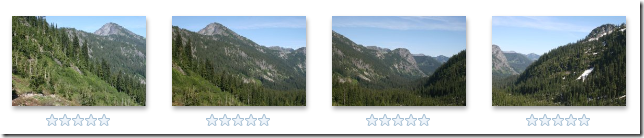
..and then create:

That's one row of four pictures stitched together into one panorama. Eventually, you're at such a big scene you're wishing: man, if I could only get more of the scene in beyond these four pictures. The sky. The rocky terrain in front of me.
You can.
You can do multi-row panoramic stitching in Windows Live Photo Gallery. Meaning that you can take your first four pictures, return to where you started and drop down a little, and take your next four pictures, and then return to where you started those four pictures and drop down a little and take four more pictures. So you can end up with something like three rows of four pictures stacked on top of each other, like:

And when you stitch those together into a panorama, Photo Gallery, using the panorama stitching power behind the Microsoft Image Compositing Editor, can line things up and create:

...which is a lot more expansive than our first stitch of just the middle site. Now then, it does look like I need more practice on remembering where I started my stitch at because of the dark area in the upper left. Hey, digital films cheap, so when in doubt, take way more of the scene than you'll need and crop it down to what you want.
So the next time you're out there taking a row of panoramic pictures, practice taking multiple rows so that when you are at a place like the overlook of Source Lake in Denny Creek, Washington, you can capture the whole, big scene. Enjoy!
Problem: I installed Windows Live Essentials on my W2K8 box and it silently does nothing when I try to start it up. What to do?
Answer: (most likely) Install the Desktop Experience pack.
Since WLPG is a desktop program, you do need to make sure that some of the fundamental aspects of a desktop environment are present on your machine. The lean, mean W2K8 install doesn't have it by default. So when you go to start Windows Live Photo Gallery on W2K8 nothing seems to happen due to a dependency check and WLPG silently fails to launch.
A KB article with more details: http://support.microsoft.com/kb/969151
If that doesn't work for you, I'd like to know.
And, yes, I know: follow-up question: Dude, why didn't you let me know that's what I need to do vs. silently fail on me?
Sorry. I have excuses but none of them good. We decided to stop blocking the install on W2K8 since folks were bright enough to circumvent the installer and get the MSIs directly. This came up late and by then, for WLPG, it was a matter of timing and risk and shipping and localization blah blah blah etc.
Follow-up to the follow-up: are you going to fix this? Yes, it has been fixed and W2K8 users won't run into this when the next version is released.
¶ 6/04/2009 02:16:00 PM 0 comments links to this post
The latest update to the LiveUpload Facebook photo uploader plug-in for Windows Live Photo Gallery is getting some good press!
The big advantage now is that if you use Windows Live Photo Gallery to tag people in your photos, the latest LiveUpload Facebook plug-in will match the people you've tagged with your Facebook friends, and when you upload such photos to Facebook *bang* they are automatically tagged and you don't have to do anything else.
First: Upload Pictures To Facebook Directly Through Windows Live Gallery (nice walk through of the initial configuration steps you'll need to do):
But if you have Windows Live Gallery, there is a nifty little opensource plugin for it called LiveUpload to Facebook that will make uploading pictures to Facebook a piece of cake.
Next, Lifehacker picked this up, too:Downloads LiveUpload to Facebook Uploads Pictures from Windows Live Photo Gallery
Once installed, uploading pictures from Windows Live Photo Gallery is easy—just open up the Publish menu and choose More Services -> LiveUpload to Facebook, which will launch a quick wizard that easily uploads your photos, picks the Facebook album and privacy settings, and can even match your Photo Gallery tags with Facebook tags—an impressive time-saving feature.
Get it here: http://www.codeplex.com/liveuploadfacebook/Release/ProjectReleases.aspx?ReleaseId=22491
¶ 2/10/2009 06:08:00 PM 0 comments links to this post
Wow, that’s a (bad) surprise:
So long, Circuit City (CC).
In a bankruptcy court filing, the electronics retailer disclosed that it has reached a deal with liquidators to sell the remaining merchandise in all 567 of its U.S. stores after failing to find a buyer or a refinancing deal, the AP reports.
From: Tech Trader Daily - Barron’s Online : Circuit City To Close All Stores; More Than 35,000 Jobs Lost.
The nearby Circuit City has been a place to at least get good deals week-to-week, although with their corporate mis-management the local store had drifted from well organized to a more hunter & gatherer focus.
Besides smaller local stores like Hard Drives Northwest I guess that leaves our area with Best Buy: well organized and very well stocked, but not very convenient + awful traffic.
¶ 1/16/2009 11:15:00 AM 0 comments links to this post
I saw a demo today of Ben Vincent's Tassography.com photo website. He's done an amazing amount of tagging in his photos and has a workflow that allows some pretty interesting view of his photos on his site.
Recently, Ben started using the latest Windows Live Photo Gallery to tag people in his photos and wanted to be able to get the same effect you have in WLPG of when you hover over a face it tells you who it is. For this, Ben extracted the new meta data that WLPG stores in each photo when you tag people:
The most compelling new feature for me is the new people tagging capabilities. Not only does it store who is in a photo but also where they are. Unfortunately there’s no real standard for where to store people, let alone their location in the picture. Facebook does something similar but doesn’t store it in the photo and most applications just store the name in a keyword or the People XMP field. So the decision was made to store this in a private XMP namespace, which at least provides a standard way of accessing the data. The good news is, Microsoft channels lots of this thinking through a single group, so Windows 7 also uses the same format.
Ben's full post: Understanding how Windows Live Photo Gallery’s People Tags are Stored - Windows Live
¶ 1/15/2009 05:05:00 PM 1 comments links to this post
All sorts of problems can happen when you roll-over and carry a digit:
So we're busy preparing the major upgrade from 9.5x and 9.6x - and what's more obvious than calling it Opera 10? What's in a name, or a version number?
Apparently a lot of trouble.
More here: 10 is the one - By Hallvord R. M. Steen
¶ 12/18/2008 09:37:00 PM 0 comments links to this post
It has been a busy year. Not long after the Wave2 Windows Live release went out the door we immediately started planning for the next release. And here, before the end of 2008, is the latest refresh to Windows Live: Windows Live Essentials (Beta).
Just at a high level, these are the following changes you'll see in the latest refresh of WLPG (Windows Live Photo Gallery) as compared to the Wave2 2008 version:
Editing
- Noise reduction: new for our refresh release. This is a heavy duty intensive algorithm to look for noise in your picture and help smooth noise out and make it go away. If you're shooting with a point and shoot camera at high ISO (usually in dark rooms) you end up with a lot of color noise dots. This helps to reduce that noise. It's under "Adjust Detail" in the fix pane. It can be a very subtle effect but will make your noisy pictures look less distracting.
- Straighten: we've added straighten to WLPG. In fact, it will first do an auto-straighten if possible. You can also tweak it so that you're happy with the way things line up. I never realized how crooked of a shooter I was until I started shooting with my Canon Rebel. I'm going to use this feature a lot. The team was so happy with it, that Straighten was added to the Auto-Fix command.
- Black and White: and not just one black and white effect but six.
Panoramic Stitching:
- Improved! Our popular panoramic stitching engine has been updated (the same engine within I.C.E.). You'll see more natural horizons and blue skies that blend together better.
Publishing to more and more places:
- Skydrive: by default, WLPG now publishes your http://photos.live.com/ albums to your Skydrive.
- Groups & Events: did you know that you can have photo albums for an event you create? It's a great way of having everyone dump their photos into one spot to share with everyone else. Invite them to an event and then all they have to do is use WLPG and select Publish -> Event album and the event should be listed. Same for publishing to a group shared album.
- Plug-ins! Rather than us write code for every popular place to publish photos (and keeping up with their changes) the WLPG team added the ability for smart folks to take our example flickr publish plug-in and customize it to publish photos and/or videos to different sites. http://blogs.msdn.com/pix/pages/Plug_2D00_ins.aspx contains the list of plug-ins we know about, including publishing to Facebook and SmugMug.
UI Improvements:
- Star rating filter returns: it was in Vista Photo Gallery and removed for Wave2. It's back.
- More space: collapsible navigation tree: you can now make the navigation tree collapse to get more room. Either double click on the line drawn between the gallery list view and the navigation tree or just grab and move all the way to the left to make it go away. Click on the narrow arrow region that appears to make it come back.
- More space: simpler navigation controls on bottom: we moved down to the lower status bar the next / previous / rotate / delete / slide-show / play buttons, along with the zoom controls and the view control. This gives you back vertical space to have more to enjoy your photos. Yeah!
- More info in the Info Pane: when you select a photo, you'll see more information in the Info Pane about the photo, like camera, author, exposure, aperture, focal length, and ISO. One: you can geek out over studying stuff like this to improve your photography. (2) it can help explain sometimes why something doesn't look right (like the time I accidently put my camera into ISO 1600 in bright, bright daylight).
- Brighter: the overall UI is brighter and leaner, removing icons from the command bar.
People Tagging:
- Contacts: when you sign-in to your Live ID, we now download your Live Contacts into WLPG.
- Simple people tagging: whether you're signed in or not, this allows you to say who is in a photo by entering a name. Good!
- Contact people tagging: you can also people tag someone in a photo who is specifically from your contacts list. Great!
- Face tagging: in addition to just saying "Eric Richards" is in the photo, you can point me out in the photo. You can draw a rectangle around my face or, if I'm looking directly into the camera, we've probably auto-detected that there's a face there and you can just click on that face to call out that it is me.
- "That's Me!" tagging: once you're signed in, you can also go through the photos quickly noting where you are.
- People in the navigation tree: in the navigation tree, you can look at your photos by folder, by date, by descriptive tags, or by the people in your photos. And if you're signed in we have your address book and you can drill in to find your family or coworkers. Click on them to see the photos you've tagged them in and a little extra…
- Person page: when you click on a person in the navigation tree, you get a special view of all the photos that person has been tagged in and (if they have a Live ID) which albums they've published to Live Photos and a quick way to visit their Live Photos Page.
- Profile pictures: if your contact has a Live ID and they've set a profile picture, we'll show it when you click on them in the navigation tree and we'll show it when you're tagging people via our people selector box.
Additional features:
- Offline sign-in: you can sign-in now even if you're not connected to the network. We'll, after you've signed in at least once while on-line to let the system cache what it knows about you. This way, even if you're off the network, you can still have your contacts loaded and do some people tagging and viewing.
- Windows Live Sync: if you're a Windows Live Sync user, you can synchronize your photos now between your PCs, including the originals that we save away in your application data so that you can always restore an original after doing some edits.
- Touch: we've done some Touch features that you'll get to enjoy when you're running Windows 7.
- Blog posting: you can fire up Windows Live Writer within WLPG to blog about a set of photos.
- Extras: while it's a nifty idea to try to do everything in WLPG (create photosynths, do some geo-tagging, auto, etc.) we just can't do it all. You can at least install some of our premier photo tools and then find and select the photos in WLPG and launch the appropriate nifty application via the Extras menu.
- Meta-data control: under the options menu there is more level of detail about what kind of meta-data you want preserved or stripped out when you share your photos.
- Tag Clean-up: sometimes you end up with descriptive tags that no longer apply to your photo set. You can especially run into if you have a load of hyper-tagged stock photos and then get rid of them. You can now go and have WLPG scrub your tag database to remove any tags no longer associated with photos.
And there's a lot more that happened under the hood, so to say. I'm very proud to work with the engineering team that made this year's worth of work on Windows Live Photo Gallery possible.
Larry Osterman recently talked about Feature Crews (http://blogs.msdn.com/e7/archive/2008/10/15/engineering-7-a-view-from-the-bottom.aspx ) and I have to say that the Photo Gallery feature Dev, Test, and PM members did an excellent job driving the decisions and work to get their features implemented. The product has remained solid for the development cycles, which is hard when your hooking up some major new gears, so to say.
And now we're out with a new refresh! Enjoy! Be sure to get a Live ID, set a profile picture, and publish some photos up to your Skydrive and play around with it. While you're on the new http://home.live.com/ site, note that you can import your contacts from Facebook or LinkedIn to start building your contact list for People Tagging. And man, if you're on Facebook, you should go to our plug-ins page and that the Facebook plug-in for publishing photos to your Facebook account.
Drop by our official team blog (http://blogs.msdn.com/pix/ ) to learn more about the current refresh and to pose any questions + issues.
Although Virtual Earth mapping has the rocking Bird's Eye View for looking at neighborhoods - which for me usually end up being a lot more interesting than the overhead view, especially with the ability to rotate around various angles - RedFin just switched to Google Maps because of the driving need to be able to draw lots of push-pins fast:
"Every millisecond counts" is a "Googley" UX design principle that we remember from Marissa Mayer’s evangelism of speed and that we strongly believe in (see here, here, and here). Users who come to Redfin's site now should see maps load and render just a little bit quicker, which makes us feel a little Googley inside.¶ 12/12/2008 08:27:00 AM 0 comments links to this post
A write-up on WLPG's latest beta at PC Magazine. The summary:
Bottom Line
The Windows Live Photo Gallery (Wave 3) beta has improved editing tools, a unique people-tagging feature, and the ability to upload to Flickr and other services. But Photo Gallery still trails Picasa, which has better face tagging and integration with online galleries.
Pros
Good organization of photos. Easy uploading to online photo galleries, including non-Microsoft sites. Automatic face tagging. Excellent panorama creation.
Cons
No geotagging. No help with screen captures. People tagging trails Picasa's equivalent. Limited slideshow and special photo-effect options. No blemish remover. Unsupported camera RAW formats.
Looking at the Cons...
Around the people tagging: given that it's in the Windows Live Photo Gallery desktop client and Picasa people tagging is currently Web Picasa only, WLPG a lot more interesting for actually organizing your full-resolution photos by people and enjoying them on your computer, including the photos you're not keen spending the time (or risk) putting online. Given that you tag the people once on your hard disk, you can do groovy things like get the LiveUpload Facebook publish plug-in and ba-damn! all your people tags get auto-Facebook tagged for people with the same names on your Facebook friends list.
Groovy.
And there's certainly the opportunity for the people tagging metadata in the photos to be used and read by other photo sites going forward. It's pretty easy for them to just look at the XMP XML blob and do something with it. This includes Web Picasa.
I'm not sure what Mr. Muchmore's RAW comment on the Cons list meant. If you have the appropriate raw codec installed for your photos (like Canon's for CR2 files) you'll be able to see them in Photo Gallery just fine and organize away. See, not edit. But you have to have the manufacturer's codec installed. Also, if you're heavy into RAW, you most likely have been using the RAW software that came with your camera or have sprung the big-bucks for a RAW-focused photo editing environment like LightRoom, so again, not really a focus as of today for real point-and-shoot and mobile-phone-photo-snapers.
Screen captures? This is important for consumers? I'd like to know more.
And for geotagging lovers (an exuberant but perhaps tiny minority - of which you can see I'm a member if you go to my flickr map page), you can at least download the Microsoft Pro Photo Tools and it shows up under the Extras menu in WLPG Beta, meaning that you can select a bunch of files to send over to Pro Photos to geotag etc.
This is why you want diversity in ownership of media companies:
Joystiq broke word this evening that Netflix stopped Xbox 360 users from streaming movies distributed by Sony Pictures Entertainment.
It makes no sense for a huge electronics company to be allowed to own media like this. This is a pretty obvious negotiating tactic, probably around getting NetFlix for the PS3 and preventing the Xbox from having a living room advantage.
Usually, it has been to Sony's extreme strategic loss to own these media companies. This ownership killed their Walkman line: here you are creating a media player that, you know, might be playing music pirated from the other parts of your own company. Better put in some exotic extremely distasteful codecs that no one wants to ensure that the media only comes from physical CDs.
Oh, and put a rootkit onto our CDs so that we can prevent people from ripping them.
Dumb. And now their stupidity spreads.
Sony should be forced to sell off their media assets.
Original story: MTV Multiplayer » Netflix Speaks Out On Sony Movies Disappearing From Xbox 360 Service — It’s Not A Glitch
¶ 11/19/2008 09:15:00 AM 0 comments links to this post
Will Duff has released his Facebook plug-in for Windows Live Photo Gallery that lets you not only upload your pictures to your Facebook account but also works with People Tagging in the latest version of Windows Live Photo Gallery (currently in Beta):
LiveUpload to Facebook is a plug-in for Windows Live Photo Gallery Beta that makes it easy for anyone to upload their photos to Facebook. The plug-in takes advantage of the new people tagging feature in Windows Live Photo Gallery Beta to persist your people tags onto Facebook.
Features:
- Organize and tag your photos in Windows Live Photo Gallery Beta.
- Quickly and easily upload your photos to Facebook, including any people tags added in Windows Live Photo Gallery Beta.
- Upload your pictures to an existing album or create a new one.
Download link: LiveUpload to Facebook – Home
Will also has an upload to YouTube plug-in: LiveUpload to YouTube – Home
Good job, Will! It's great to see these plug-ins released.
¶ 11/14/2008 12:17:00 PM 0 comments links to this post
John Thornton has a new blog entry up about people tagging in the current Windows Live Photo Gallery beta, including some pretty nifty UI animation to show how it works when you're noting just who is in a photo: Windows Live Photo & Video Blog : Why "people tags"?.
Rodger Benson has the newest WLPG post up: Windows Live Photo & Video Blog : Photo Gallery beta cheat sheet where he goes through at a high level most of the new features in the current beta.
Two of the areas mentioned that we've invested heavily in:
- People tagging: rich meta data for the photo indicating who is in the photo and, optionally, where they are in the photo. We have face detection running to help. Also, for those who like to quickly go through their photos noting themselves, we have a "That's Me!" button.
- Publishing plug-ins: did flickr just add some new feature that we don't support? Do you wish we did something a little different publishing to flickr? You don't have to wait on us, you can write your own plug-in to add that feature to flickr, or write a plug-in to publish to a whole new different destination.
For editing, the straighten feature is something I use heavily. For some reason, I take crooked pictures. Too busy enjoying the shot to frame it right, I guess. With straighten, the gallery will first attempt to automatically correct the photo, and usually that's pretty good. But you can go in and fix it up before applying the change.
I also enjoy the new Info Pane with all the extra info about the photo (date taken, size, exposure, aperture, etc). I miss it when I use the previous version.
Going back to people tagging: note that on sign-in we download your contacts and show them in People tags. For your contacts that have Live IDs and that have set a public profile picture for themselves, we download that picture as you start tagging them in various photos. Then, as you tag them, you'll see their public profile picture in the tagging UI. And in the header if you click on them in your People tags tree.
Ready for the latest Windows Live Beta?
- Downloads - Windows Live - official download link.
And, the Windows Live Photo Gallery download page:
...has a high-level overview of some of the new features.
Today is the day. Windows Live Beta is released later today. Everyone (well, every brave soul willing to install Beta software) can have a chance to try out what we’ve been working on for the past year.
Chris Jones: Windows Live Wire : Building Windows Live.
The Official Photo Gallery blog: Windows Live Photo & Video Blog Next version of Windows Live. That’s also a good place to leave your constructive feedback for the whole team to consider.
Be sure to subscribe to the Photo Gallery (aka, Digital Memories Experience) team blog for frequent updates about the new features. I’ll post some high-level run-throughs, too, of what’s new in the Gallery and do my best to track interesting feedback that shows up in my blog searches.
More later.
Oh, wait, more now: LiveSide has their initial take here: Wave 3 Windows Live Photo Gallery – New Features – LiveSide (and shows the end-to-end frustration we all share when way-off-the-mark speculation over unreleased / undiscussed features happens, so don’t be sad about something that was never there).
This past week, Microsoft held the Pro Photography Summit, with many attendees being people who make a living through their photographic skills. In "Photo Business News & Forum Microsoft Pro Photo Summit 2008 - Recap" John Harrington not only supplies some follow-up links from the presentation but also digs into friction around defining who is a "Pro" and who is not.
Interesting reading.
I'm not tracking it because I'm a pro. I'm not even really a Prosumer Photographer (the enthusiast who spends lots and lots and lots of money on professional level gear). Okay, I've got some nice glass but I'm shooting on a Canon 400D, not even a 40D, let alone a 5D.
And that's fine for me.
But I am amazed going around and paying attention to the kinds of cameras people have nowadays. When I was at Cougar Mountain Zoo taking a few shots, a couple showed up and they each had super impressive camera gear. While my lovely Rebel let out an enthusiastic ka-snap with each shot, their's whispered along quickly with barely discernable clicks.
And hiking around Twin Falls State Park revealed lots of folks toting about heavy duty gear.
Hope sells. It sells gold mining tools and it sells great camera gear. The hope to publish your stuff and have it syndicated as news or syndicated through flickr / Getty Images, well, that inspires people to get better results and to enjoy chasing the dream. Let alone the joy of taking great photos to share. And anything that helps photographers in that pursuit - and that makes them feel as good as a Pro - they are going to love.
¶ 7/11/2008 01:06:00 PM 0 comments links to this post


